Dexp produces a wide range of different equipment, including TVs and remote controls (RC) for them. In order for the TV and the remote control to work correctly, you need to choose the right one and configure the devices.
- Instructions for using the remote control for TV Dexp
- Description of the buttons on the Dexp remote control
- Tuning TV channels with the remote control
- How to turn on Dexp TV without remote?
- How to connect and set up a universal remote control for Dexp?
- How to buy a suitable remote control for Dexp?
- Which remote is suitable for Dexp TV?
- Original TV remotes Dexp
- Selecting a universal remote
- Possible malfunctions of the remote control and ways to solve them
- Download virtual remote control for Dexp TV for Android and iPhone for free
- Questions about Dexp and its products
Instructions for using the remote control for TV Dexp
First of all, open the battery compartment of the Dexp TV remote control by pressing the cover tab (located on the back of the remote control) and insert two AA alkaline batteries (not included) according to the “+/-” indications drawn inside the compartment for batteries.
Installing the batteries should not take more than 5 minutes, otherwise the settings will be lost and the remote control will need to be reset.
Description of the buttons on the Dexp remote control
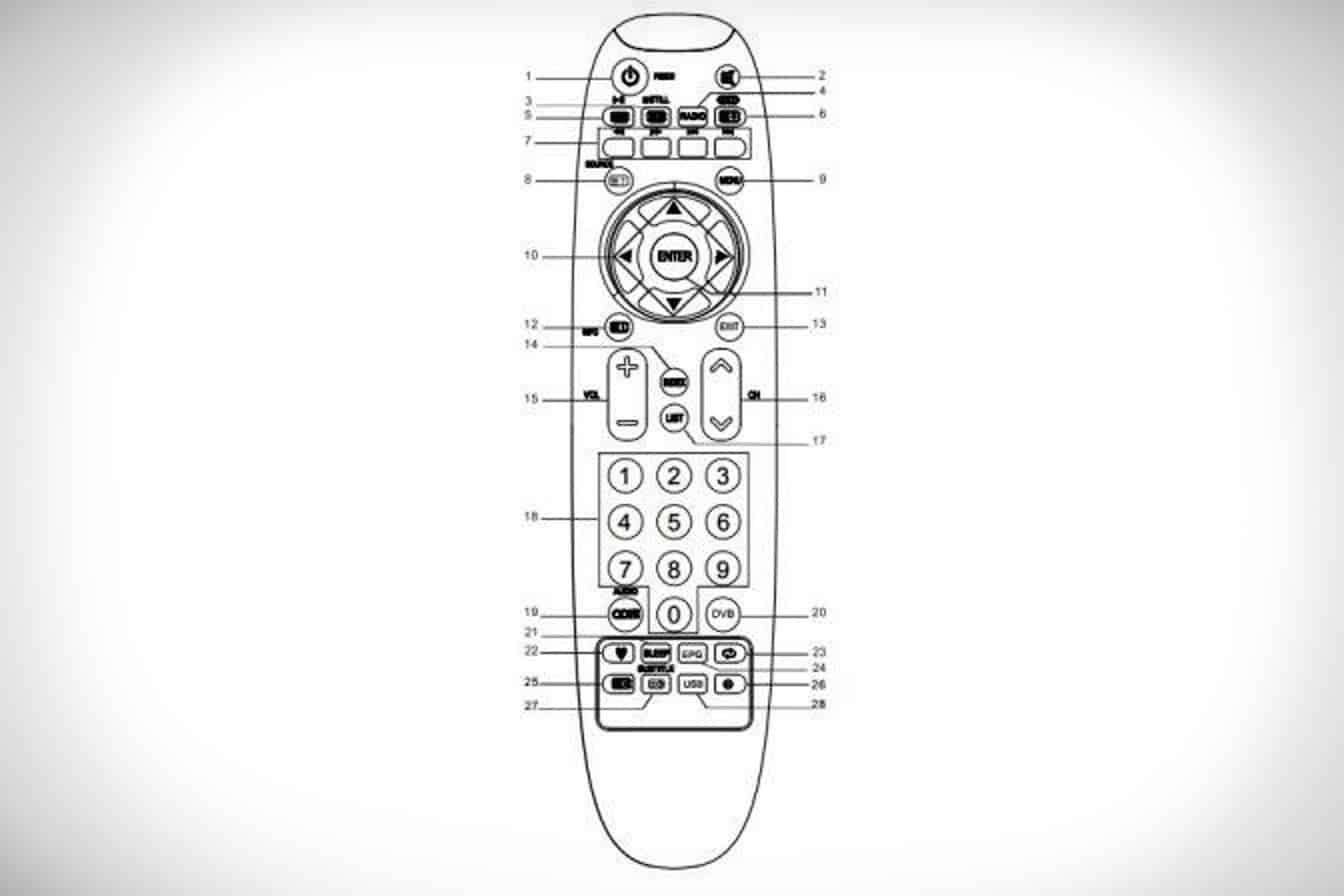
To successfully use the Dexp TV remote, you need to know the purpose of its buttons. They are the following:
- I – on / off the TV.
- MUTE – turn on / off the sound.
- STILL – pause the broadcast, hold the teletext on the screen.
- REC – activation of the beginning of the recording.
- RADIO – switch between TV and radio (in CTV mode).
- EPG – enable the electronic schedule of TV programs.
- TXT – enter the teletext mode, multi-picture.
- SIZE – Select the teletext format.
- DVB – digital antenna selection.
- Colored buttons – red/green/blue/yellow for teletext: rewind, forward, return to the previous record, and to the next (in USB mode).
- AUDIO (∞I/II) – Select the audio mode.
- SOURCE – source selection. View hidden information in teletex.
- ON – display subtitles or page code.
- MENU – activation of the pop-up menu with different settings.
- SLEEP – Turn on the sleep timer. The TV receiver will turn off after the time specified by the user.
- FAV – opening a block of favorite channels.
- Navigation buttons – right / left / up / down.
- ENTER – Select and activate options.
- USB – open a connected USB storage device.
- RETURN – return to the last included program.
- OUT – turn off the teletext mode.
- INFO – Open information about the current TV program on the screen.
- Numeric keys – select a TV channel or set a password.
- EXIT – exit from the menu mode.
- INDEX – go to the list of records (in DTV mode).
- LIST – call the list of TV channels (content).
- VOL + / VOL- – volume up and down buttons.
- CH + / CH- – buttons for switching channels.
Tuning TV channels with the remote control
Setting up the broadcasting of Dexp TV channels can be automated and manual. How to find channels in auto mode:
- Go to the main menu.
- Go to “Channels”
- Select your country of residence, and the channel search mode is auto search.
- TV mode will automatically store all found TV channels. The completion of the search will be indicated by the indicator strip on the screen, which has reached the end, and the inclusion of the first channel.
Video instruction for setting up free channels:
How to make manual settings:
- Open the menu and go to “Settings”.
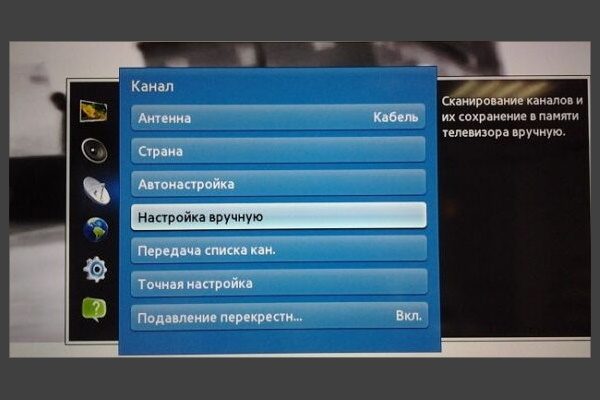
- Go to “Channels”, select the country, the signal source “antenna”, and open the item with manual settings.
- Enter the frequency (MHz) and channel number (TVK) for the 1st multiplex . You can find them on the website https://prodigtv.ru/efirnoe/technonlogiya/karta-cifrovogo-televideniya by entering your location.
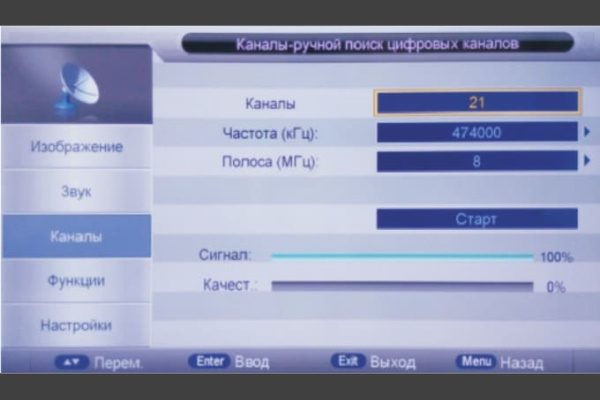
- Activate the search with the corresponding button.
- When channels are found, the search will stop and they will be stored as numbers.
- Repeat the search for the 2nd multiplex using the appropriate values.
- When everything is found, you can start viewing.
It is also worth knowing how to edit the list of channels for yourself (swap them):
- Go to settings and go to “Channels”
- Select “Edit”/”Manage channels” using the up/down buttons.

- You will see a list of TV channels. Move to the desired one using the forward or backward buttons (CH + or CH-), and: to delete – press the red button, rename – green, move – yellow. Here you can also add a TV channel to the list of favorites.

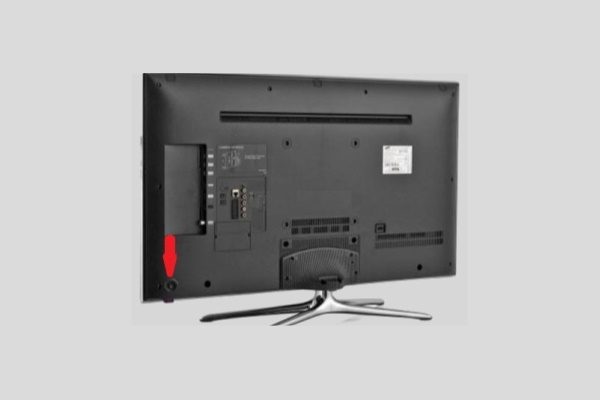
How to turn on Dexp TV without remote?
The on/off button is the only one on the Dexp TV case. Therefore, it is easy to find it. An arrow points to it in the picture:
How to connect and set up a universal remote control for Dexp?
There are two ways to connect and configure the universal remote control (UPDU) – automatically and manually. If you have not done this before, strictly follow the instructions. Autotuning is done like this:
- Turn on the TV with an old remote control or a button on the body of the TV itself.
- Point the universal remote control at the TV.
- Press the “Set”/”TV” button and hold it for 2 to 7 seconds until the indicator lights up.
- Press the channel switch button, then auto tuning will start.
- When the icon turns off, immediately click “OK” to save the pairing.
If the automated setup fails, proceed to manual debugging. To do this, you will need the codes presented in the table below. How to do self-configuration:
- To start the programming mode, press and hold the “OK” and “TV” buttons simultaneously for about 5 seconds. If everything is done correctly, the TV button indicator will light up.
- Select “Self Diagnosis”, and enter the code from the table.

- Confirm the entered password with the corresponding button.
- Check the control functions – press any button on the remote and make sure the TV is responding to commands. If there was no response, enter the following codes in turn until the code matches.

If you’ve tried all the codes and still can’t connect the remote to your TV, or your TV’s brand is not listed, try the following:
- Turn on the TV you want to control and point the remote at it.
- Hold the “Set” button and at the same time “TV” until the indicator lights up permanently.
- After releasing the keys, press the “Vol +” button. The soundbar should appear on the TV screen. Repeat these steps until the volume bar appears on the TV.
- Press the “Set” button. The indicator should turn off and the settings will be completed. You can test other buttons, such as the power key, to make sure they work properly.
If other keys do not work, reconfigure the remote and re-follow the steps from step 2.
Table of remote control codes for Dexp TVs:
| Brand | Codes | Brand | Codes | Brand | Codes |
| AIWA | 009, 057, 058. | JVC | 089, 161. | SHENYANG | 011, 016, 025, 046, 045, 033. |
| AOLINPIKE | 033, 053 056 079. | JUHUA | 011, 023, 024, 033, 040, 043, 053, 056, 079. | SAIGE | 011, 025, 016. |
| ANHUA | 017, 001, 032, 047. | JINGHAI | 009, 057, 058, 099. | SONGBAI | 016, 025. |
| AOLINPU | 104. | JINFENG | 001, 011, 021, 022. | SANYUAN | 003, 011, 016, 018, 023, 024, 625, 040, 043. |
| AVEST TRB-2558 | 073. | JINTA | 016, 023, 024, 025, 033, 040, 043, 053, 056, 009, 057, 058, 079. | SANLING | 036, 044. |
| AVEST 54ТЦ-04 | 013. | JINQUE | 011, 025, 016. | SHENGCAI | 057, 101. |
| BENQ | 294. | JINQUE | 032, 033, 053, 056, 079. | SHUYUAN | 131, 204. |
| BAIHUA | 016, 025, 033, 053, 056, 079. | JIAHUA | 017, 047, 001, 032, 033, 101, 149, 207. | SONGDIAN | 101. |
| BAIHEHUA | 023, 024, 040, 043. | JINXING | 007, 008, 011, 013, 024, 025, 032, 033, 039, 051, 057, 065, 071, 073, 079, 091, 097, 102, 107, 138, 225, 227. | SEYE | 097. |
| BAILE | 016, 025, 012, 019, 026, 027, 028, 029, 030, 031, 042. | KAIGE | 011, 016, 023, 024, 025, 033, 040, 043, 053, 056, 079. | SHENGLI | 004. |
| BAOSHENG | 011, 025, 016. | SANJIAN | 033, 053, 056, 079. | SHERWOOD | 016, 025. |
| CAILING | 102. | SUMO | 214. | NANSHENG | 011, 033, 053, 056, 079. |
| CAIHONG | 011, 025, 016. | SANKEN | 215. | NIKON | 009, 057, 058. |
| CAIXING | 023, 024, 040, 043, 073. | SONY | 041, 049, 005, 094, 106, 148, 237, 238, 239, 240. | NEC | 006, 011, 016, 004, 025, 033, 053, 056, 024, 079. |
| CHANGCHENG | 011, 016, 017, 023, 024, 025, 033, 040, 043, 053, 056, 001, 012, 019, 027, 026, 028, 029, 030, 031, 042, 079. | SAMSUNG | 008, 011, 016, 021, 024, 025, 033, 037, 039, 040, 043 050, 051, 091, 113, 123. | NEC | 089, 140. |
| CHENGDU | 011, 025. | SANYO | 008, 000, 007, 014, 015, 033, 035, 053, 056, 079, 105, 352, 353, 354. | NANBAO | 016, 025, 033, 053, 056, 009, 057, 058, 079. |
| CHANGFENG | 011, 053, 056, 045, 046, 024, 079, 033. | XIHU | 011, 023, 024, 033, 038, 040, 043, 053, 079, 098, 131, 204, 219, 220, 221, 222. | OULIN | 101. |
| KUNLUN | OO1, O11, O21, O22, O33, 025, 012, 042, 040, 039. | XUELIAN | 023, 024, 040, 043, 009, 057, 058. | CHANGFEI | 011, 016, 025, 042, 123. |
| KUAIL | 016, 025, 033, 053, 056, 079. | XINAGHAI | 016, 025, 033, 053, 056, 079. | CHANGHAI | 011, 025, 016, 123. |
| KANGLI | 027, 012, 016, 019, 025, 026, 028, 030, 031, 033, 073, 120, 204, 271. | XINGMENBAN | 104. | CHUNLAN | 142, 107, 131. |
| KANGHONG | 009, 058, 057. | XINSIDA | 123. | CHUNFENG | 016, 025, 033, 053, 056, 079, 124. |
| KANGLI | 016, 023, 024, 025, 040, 043, 011, 026, 027, 028, 029, 042, 005. | XIANGYANG | 033, 053, 056, 079. | CHUNSUN | 011, 025, 017. |
| CHUANGJIA | 073, 101. | XINRISONG | 009, 057, 058, 101. | KANGWEI | 077, 101, 104. |
| DUONGJIE | 073, 097, 101. | YINGGE | 016 023 024 025 040 043. | LONGJIANG | 011, 033, 053, 066, 079. |
| DONGDA | 016, 025. | YUHANG | 016 025. | LIHUA | 011. |
| DONGHAI | 016, 026. | YONGGU | 016, 023, 024, 025, 040, 043. | LG | 024, 040, 098, 043, 140, 259, 260, 261. |
| DIGITEC | 214, 150, 147. | YONGBAO | 009, 057, 058. | YOULANASI | 011, 023, 024, 040, 043. |
| TOSHIBA | 000, 014, 016, 027, 033, 053, 056, 007, 008, 015, 028, 030, 089, 090, 091, 079, 159, 285, 286, 287, 355. | MEILE | 011, 023, 024, 033, 040, 043, 053, 056, 009, 057, 058, 079. | MUDAN | 001, 002, 011, 016, 020, 021, 022, 025, 032, 033, 039, 040, 043, 053, 056, 059, 063, 065, 079, 101, 107, 145, 146, 149, 218, 223. |
| DETRON | 212. | YAJIA | 033, 053, 056, 079. | MENGMEI | 023, 024, 040, 043. |
| DAYU | 012, 042, 031. | YOUSIDA | 016, 025, 009, 057, 058. | MANTIANXING | 114. |
| FEILU | 011, 016, 025. | ZHUHAI | 016, 025, 042. | Mitsubishi | 011, 051. |
| FEIYUE | 011, 016, 023, 024, 025, 040, 043. | PDLYTRON | 151, 152, 214. | IMPERIAL COWN | 033, 053, 056, 012, 019, 025, 026, 027, 028, 029, 030, 031, 042, 079. |
| FEILANG | 016, 025. | PANASONIC (NATIONAL) | 020, 001, 002, 014, 015, 021, 022, 059, 066. | JIALICAI | 016, 025, 028, 033, 053, 056, 079, 124, 178. |
| FEIYAN | 033, 053, 056, 079. | PHILIPS | 013, 023, 024, 039, 040, 043, 141, 241, 242. | JINGXINGBAN | 104. |
| FUJITSU | 048. | QINGDAO | 001, 011, 021, 022, 033, 053, 056, 079. | JINGLIPU | 038, 057. |
| FULI | 047. | RIZHI | 073, 097. | KONGQUE | 011, 016, 023, 024, 025, 033, 040, 041, 043, 124. |
| GOLDSTAR | 009, 019, 023, 024, 040, 043, 098, 140. | ROWA | 011, 013, 016, 023, 024, 025, 040, 043, 096, 127, 248, 267, 268. | KANGHUA | 103. |
| GANGTAI | 097. | RUBIN | 040. | SHAOFENG | 011, 015, 000, 006, 007, 023. |
| haier | 103, 105, 112, 118, 119, 175, 178, 185, 186, 187, 188, 201, 205, 206, 218, 272, 356. | SHARP | 003, 018, 016, 025, 135, 136, 137. | TIANE | 003, 011, 018. |
| HITACHI | 007, 015, 014, 027, 000, 006, 008, 010, 048, 179, 228. | SHENCAI | 007, 016, 025, 033, 053, 056, 079. | TONGGUANG | 033, 053, 056, 079. |
| HITCH FUFIAN | 007, 011, 015, 023, 024, 028, 033, 034, 040, 043, 053, 056, 060, 061, 065, 079, 102. | SHANCHAI | 011, 033, 053, 056, 079. | TOBO | 016, 025, 033, 053, 056, 077, 079, 101, 103. |
| HUAFA | 007, 016, 025. | SHANGHAI | 009, 011, 016, 017, 022, 023, 024, 025, 033, 040, 043, 053, 056, 057, 058, 079, 123. | WEIPAI | 016, 025. |
| HUANGHE | 011, 016, 023, 024, 025, 040, 043, 051, 103, 125, 155. | TCL | 051, 053, 068, 071, 073, 082, 083, 084, 085, 110, 111, 144, 156, 199, 209, 216, 243, 244, 245, 246, 247, 248, 249, 313, 314, 315, 316, 317, 320, 343, 344, 349, 350. | XIAHUA | 011, 016, 024, 027, 025, 033, 053, 054, 055, 056, 060, 098, 080, 095, 079, 073, 209, 211, 217, 218, 229, 230, 231, 262, 295. |
| HUANGHAIMEI | 016, 025. | HUIJIABAN | 101. | OTHER BRAND | 036, 044, 057, 073, 077, 097, 101, 102, 103, 104, 106, 114, 178, 293, 328. |
| HUANGSHAN | 011, 016, 023, 024, 025, 032, 033, 040, 043, 053, 056, 079. | HUANYU | 011, 015, 023, 024, 033, 040, 043, 053, 056, 009, 057, 058, 079. | HONGMEI | 003, 011, 016, 018, 023, 024, 025, 033, 040, 043, 056, 009, 057, 058, 079. |
| HUARI | 007, 033, 053, 056, 079. | INTEL | 213. | HONGYAN | 011, 033, 053, 056, 079. |
| HAIYAN | 011, 023, 024, 033, 040, 043, 053, 056, 079. | HAILE | 032, 047. | DONGLIN | 077. |
How to buy a suitable remote control for Dexp?
Like any piece of equipment, Dexp TV remotes require good working conditions. However, no product is immune from failures and defects at any stage of operation. The TV remote control is the most vulnerable and unprotected, and in most cases breaks faster than the device it controls.
You can buy or order a remote control for a Dexp TV in specialized stores and marketplaces – for example, on Ozone, Valberis, Yandex.Market, Avito, etc.
Which remote is suitable for Dexp TV?
If your TV is not from the latest generation of Dexp, then the analogue of the remote control you buy must completely match the original in terms of external design, the position of each button must be the same, and all the inscriptions on them. From third-party brands, Doffler, Hisense, Supra, etc. remote controls are suitable.
Original TV remotes Dexp
To buy an original remote control for your TV receiver, you need to find out the number of the old one. This information is located on the battery cover. If the remote control is lost, the series can be found on the Internet – by the number of your TV or set-top box (written on the back of the case). Examples of remote control series:
- dz 498;
- dzl 453;
- dz 498s.
TV number example: H32D8000Q. Example number on the prefix: HD2991P.
Selecting a universal remote
The best option is the Dexp cx509 dtv universal remote control, produced by both the manufacturer and Chinese companies. The quality of the instruments varies. Devices made in China are cheaper and a budget option. But no one guarantees good quality. The remote control may be unstable. The original universal remote control costs several times more, but it works flawlessly. It fits perfectly with a certain range of models and acts like a native. Therefore, before buying a universal remote control – real or Chinese, weigh all the advantages and disadvantages.
It is wrong to think that if the remote is universal, it will automatically work with all brands and models of TVs. Before buying another brand of UPDU, you need to make sure that it fits your TV (the list of brands is in the instructions).
Possible malfunctions of the remote control and ways to solve them
If the TV remote control does not work, do not rush to throw it away and buy a new device. Let’s see what kind of malfunctions the remote control can have, and why they happen:
- The batteries are out of order. A banal but common problem is that people simply forget to replace dead batteries.
- “Protection from children” is exhibited. If this mode is enabled, the TV will not respond to all remote control commands until you disable the limitation.
- Water or other liquid has entered. She could damage the chip. You can try to disassemble the remote control and dry it thoroughly, and then put it back together. If it doesn’t work, just replace.
- Accumulation of dust and dirt inside the case. Because of this, some buttons get stuck – when pressed, the TV does not respond.
- Mechanical damage. This may be due to frequent drops that damage the chip or microcircuit.
The instructions for disassembling the Dexp remote control can help determine the exact cause of the malfunction and fix it yourself. The principle of manipulation is the same regardless of the brand and model:
- Open the battery compartment and remove the batteries.
- Carefully pry up the housing with a flat screwdriver and see if it is screwed on or not. If there are screws, then first unscrew them, and then separate the parts of the remote control. If not, just run a screwdriver gently along the case and the latches connecting it will open.
- Soak a cotton swab or disc in alcohol and wipe the parts, except for the microcircuit and chip. If the rubber gasket with buttons is heavily soiled, it can be washed under running water.
- When all parts are completely dry, assemble the remote control. The panels are connected with latches.
For drying, it is best to use a household hair dryer. This is the fastest and most reliable way.
Video instruction for cleaning PU:
If, after assembling the remote control, the TV responds to the commands of the remote control, everything is in order. And if the TV does not respond to signals, you should contact the repair shop or buy a new remote control.
Do not damage the housing when disassembling. If you cannot remove it yourself, contact a specialist.
Download virtual remote control for Dexp TV for Android and iPhone for free
Android and iPhone smartphones have many useful features. The ability to control the TV is one of them. This option greatly simplifies life, since the phone is usually always at hand, which cannot be said about the remote control, which always strives to hide somewhere from the owner.
This control method can only be used for smartphone models with Wi-Fi, infrared, and Bluetooth functions. If the device does not have the necessary technical capabilities, you will not be able to find and install the application.
You can control TV by no means from all smartphones. Only a few manufacturers offer this feature. Xiaomi is among them. The brand’s phones have a built-in, but not activated, “MI Remote” application. To make it work:
- Download and install a special program in the application store that is responsible for controlling the TV.
- Synchronize the application with your TV device – most often, you just need to open the program on your phone and point the gadget at the TV. After that, you can begin to fully control the TV.
Not all Dexp TVs can be controlled from your phone. This is determined by experience.
If your phone does not have a factory application that can be controlled as a remote control, but there is an infrared port, try downloading the program from the application store. There are many of them. Video on how to control TV from your phone:
Questions about Dexp and its products
Dexp manufactures a wide variety of products, and in this section we will give answers to questions related to its functioning. Questions about the equipment manufactured by the company:
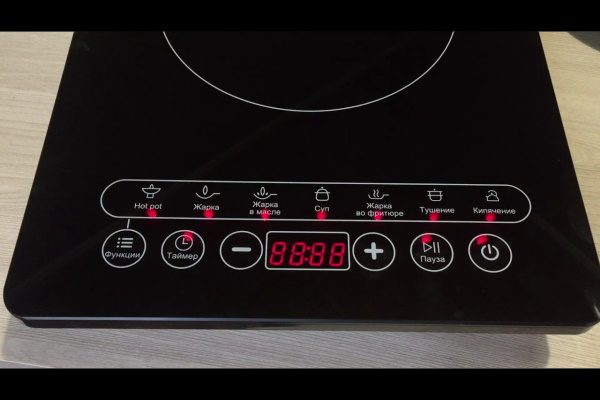
- How to turn on the Dexp cooker? There is an on/off button on the control panel.
- Which TV is analogous to Dexp? This brand is not an analogue, but belongs to DNS, one of the leaders in the Russian market of digital and household appliances.
- Instructions for the Dexp column. You can study the manual for the portable speaker in the document – https://ftp.dexp.club/UM/Speakers%20%2B%20portable%20speakers/DEXP%20P150%20UM%20RUS.pdf. There you will also find the answer to the question of how to set up the radio on the Dexp column.
- How to set up the children’s watch Dexp k2? First you need to install a Nano-format SIM card in your watch with the support of 2G Internet by your operator. Further:
- Search and download “SeTracker” in the app store.
- Register an account with the program. Select “Add a device”, where in the ID field enter the 15-digit registration code found on the bottom of the watch, or scan the QR code located on the same side and then enter a name.
- How to adjust the backlight on Dexp k 901bu/charon? The keyboard has many unique backlight modes. You can switch them in two ways: by successively pressing FN + SL, or by one of the combinations – FN + INS / HM / PU / DEL / PD, depending on what kind of backlight you need.
- How to connect to Dexp mr12 phone? An HDMI 1.4 adapter is required to connect this media player to a smartphone.
- How to connect Yandex-remote to TV? In the Yandex application menu, select “Devices”, then “Remote control” and “Add remote control”. Select the type of home device – TV, then click “Auto Setup”. Name your device and follow the instructions in the app.
- What codes are suitable for connecting the MTS remote control to Dexp TV? Combinations should fit: 1007, 1035, 1130, 1000, 1002, 1031, 1027, 1046.
- Instructions for the Dexp machine. You can study the instruction manual here – https://storage.yandexcloud.net/pdf/190130/2111489179263523.pdf
- How to turn on the push-button phone Dexp: instructions. To activate it, you need to press the call reject key, it is also responsible for turning the phone on / off. The manual can be studied here – https://ftp.dexp.club/UM/Cell%20Phones/DEXP%20Larus%20E8%20UM%20RUS.pdf
Remote controls for Dexp TVs have great functionality, and the corresponding number of buttons. To use the remote control as efficiently as possible, you need to study them, and other subtleties of the device. And also understand the connection and configuration of the remote control.